Contents
Editor's note. This is an English adaptation of Google's "Video generation prompt guide" from the Gemini Enterprise Agent Platform documentation, retold in our own words. The original belongs to Google LLC, is published under CC BY 4.0 and is linked in the sources below. We kept all the substantive advice and the short example prompts, reworded the longer ones, and left out only the site navigation and links to neighboring documentation pages. The example videos are not reproduced here. The advice isn't limited to Veo: the same prompt structure works with most video models.
Gemini Omni Flash and Veo give you an almost endless range of control through text prompts alone. This guide walks through how changing a prompt changes the result and the effects you can get. For more on best practices, Google points to its documentation page "Best practices for Veo on Gemini Enterprise Agent Platform".
Safety filters
Gemini Omni Flash and Veo apply safety filters across Agent Platform. They help keep offensive content out of generated videos and uploaded photos. Prompts that break Google's responsible AI principles, for example, are blocked.
If you suspect Gemini Omni Flash or Veo is being abused, or a result contains inappropriate material or false information, use the Google Cloud form for reporting suspected abuse.
What a prompt is made of
When you create a video with Gemini Omni Flash or Veo, the right keywords and a clear structure help the model deliver what you want. The most reliable way to steer it is to break your idea down into its key parts.
The sections below explain how to use those key elements and keywords in prompts for Gemini Omni Flash and Veo.
You don't have to use every element in every prompt. Knowing what each one does, though, helps you reach for it when it counts.
Subject
The subject is the "who" or "what" the action of the video revolves around. Being specific keeps you away from generic, stock-looking results.
Subjects you can use:
- People. General descriptions: a man, a woman, an elderly person. Professions: "a seasoned detective", "a cheerful baker", "a futuristic astronaut". Historical figures. Mythical beings: "a mischievous fairy", "a stoic knight".
- Animals and creatures. Specific breeds and species: "a playful golden retriever puppy", "a majestic bald eagle", "a sleek black panther". Fantasy creatures: "a miniature dragon with iridescent scales", "a wise, ancient talking tree".
- Objects. Everyday things: "a vintage typewriter", "a steaming cup of coffee", "a worn leather-bound book". Vehicles: "a classic 1960s muscle car", "a futuristic hovercraft", "a weathered pirate ship". Abstract forms: "glowing orbs", "crystalline structures".
One video can mix people, animals, objects or any combination of them. For example, "a diverse group of friends laughing around a campfire while a curious fox watches from the shadows" or "a busy marketplace full of vendors and shoppers".
Example. The video and prompt show intricate detail with several subjects:
Hyperrealistic cinematic portrait of a wise shaman whose age is hard to tell. Intricate bioluminescent tattoos that look like circuit boards cover his weathered skin and pulse softly with blue light. He wears ceremonial robes woven from dark moss and shimmering metallic fiber optic threads. In one hand he holds a gnarled wooden staff wrapped in glowing energy lines, with a crystal artifact floating above its tip. A small mechanical owl with holographic wings perches on his shoulder, its camera lens eyes blinking a soft red. His expression is calm and ancient, his gaze full of deep knowledge
Action
The action is the "verb" of the video: what actually happens. It brings the subject to life by describing movement, interaction and the smallest changes in expression.
Actions you can use:
- Basic movement. Walking, running, jumping, flying, swimming, dancing, spinning, falling, standing still, sitting.
- Interactions. Talking, laughing, arguing, hugging, fighting, playing a game, cooking, building, writing, reading, watching.
- Emotional expressions. Smiling, frowning, looking surprised, concentrating hard, looking thoughtful, showing excitement, crying.
- Subtle actions. A light breeze ruffling hair, leaves rustling, a barely noticeable nod, fingers tapping impatiently, eyes blinking slowly.
- Transformations and processes. A flower blooming in time lapse, ice melting, a city skyline changing over time. Keep the clip length in mind if the event takes a long time.
Example. The video and prompt show how to tell a story through a chain of actions and a shift in emotion:
A gloved hand carefully slits the spine of an antique leather-bound book with a scalpel. The hand then gently pulls out a tiny metal data chip hidden in the binding. The character's eyes, focused and calm until now, widen with a flash of alarm as a floorboard creaks off screen. He quickly closes his palm over the chip, snaps his head up and scans the dim room, his whole body tense as he listens for another sound
Scene and context
The scene or context covers the "where" and "when" of the video. It is the setting that places your subject and builds the mood and atmosphere of the clip.
Examples of scene and context:
- Indoor locations. A cozy living room with a crackling fireplace, a sterile futuristic lab, a cluttered artist's studio, a grand ballroom, a dusty attic.
- Outdoor locations. A sun-drenched tropical beach, a misty ancient forest, a bustling futuristic city at night, a quiet mountain peak at dawn, a desolate alien planet.
- Time of day. Golden hour, midday sun, dusk, the dead of night, the hour before dawn.
- Weather. Clear blue skies, gray and overcast, light drizzle, a heavy thunderstorm with visible lightning, gentle snowfall, swirling fog.
- Historical or fantasy period. A medieval castle courtyard, a Roaring Twenties jazz club, a cyberpunk alley, a clearing in an enchanted forest.
- Atmospheric details. Dust motes in a sunbeam, heat haze shimmering, reflections on wet asphalt, leaves scattered by the wind.
Example. The video shows how to build a world viewers want to step into:
The scene unfolds on a rain-soaked, crumbling street in a forgotten city locked in permanent twilight. Giant bioluminescent mushrooms have pushed up through cracks in the asphalt, casting an eerie, pulsing green and purple glow over the decaying shells of skyscrapers. A quiet, steady rain leaves shimmering reflections in the puddles below, and the only sounds are the soft patter of raindrops and the low, otherworldly hum of the glowing fungi
Camera angles
The camera angle sets the point of view of the shot and directly shapes how the audience sees the subject.
Important: some complex camera angles aren't officially supported. The result and how consistent it is depend on the prompt as a whole and on what you are trying to do.
Camera angles to try:
- Eye level. A neutral, familiar view, as if someone of the subject's height is looking at them. For example, "eye-level shot of a woman sipping tea".
- Low angle. The camera sits below the subject and looks up, making it feel powerful or imposing. For example, "low-angle tracking shot of a superhero landing".
- High angle. The camera is above the subject and looks down, which can make it seem small, vulnerable or part of a larger pattern. For example, "high-angle shot of a child lost in a crowd".
- Bird's eye view or top-down. Shot straight down from above, so the scene reads like a map. For example, "bird's eye view of a busy city intersection".
- Worm's eye view. A very low angle looking straight up from the ground, which stresses height and grandeur. For example, "worm's eye view of towering skyscrapers".
- Dutch angle. The camera tilts to the side and the horizon slants. It often signals unease, disorientation or energy. For example, "Dutch angle shot of a character running down a hallway".
- Close-up. The subject fills the frame, usually a face, to highlight emotion or a particular detail. For example, "close-up of a character's determined eyes".
- Extreme close-up. Picks out a tiny part of the subject, such as an eye or a drop of water. For example, "extreme close-up of a water droplet falling onto a leaf".
- Medium shot. The subject from roughly the waist up, balancing detail with surroundings. Common for dialogue. For example, "medium shot of two people talking".
- Full shot. The whole subject from head to toe, with a bit of the setting around them. For example, "full shot of a dancer performing".
- Wide or establishing shot. The subject in a broad setting. It often opens a sequence to show place and context. For example, "wide shot of a lone cabin in a snowy landscape".
- Over-the-shoulder. Shot from behind one person, over their shoulder, toward another person or object. A staple of conversations. For example, "over-the-shoulder shot during a tense negotiation".
- Point of view. The scene appears through a character's own eyes, as if the viewer is looking out from them. For example, "POV shot of a person riding a roller coaster".
Example. The video and prompt show a bird's eye view:
Bird's eye view of a vast, winding maze of tall green hedges. A lone figure in a red coat moves through the twisting paths below
Example. The video and prompt show an extreme close-up:
Extreme close-up of a single glistening raindrop falling onto the petal of a vivid red rose, the petal trembling slightly on impact
Camera movements
Camera movement adds energy to a shot and makes it feel more cinematic.
Camera movements to try:
- Static shot. The camera stays completely still. For example, "static shot of a peaceful landscape".
- Pan left or right. The camera turns horizontally from a fixed spot. For example, "slow pan left across a city skyline at dusk".
- Tilt up or down. The camera turns vertically from a fixed spot. For example, "tilt down from the character's stunned face to the letter in his hands".
- Dolly in or out. The camera physically moves toward or away from the subject. For example, "dolly out from the character to emphasize his isolation".
- Truck left or right. The camera physically slides sideways, often parallel to the subject or scene. For example, "truck right following a character walking along a busy sidewalk".
- Pedestal up or down. The camera physically rises or lowers while keeping a level view. For example, "pedestal up to reveal the full height of a huge ancient tree".
- Zoom in or out. The lens changes its focal length to make the subject bigger or smaller. Unlike a dolly, the camera itself stays put. For example, "slow zoom in on a mysterious artifact on a table".
- Crane shot. The camera rides on a crane and moves up, down or in wide arcs. Often used for a dramatic reveal or a high view. For example, "crane shot revealing a vast medieval battlefield".
- Aerial or drone shot. Filmed from high up, from a plane or a drone, usually in smooth flight. For example, "sweeping aerial drone shot over a chain of tropical islands".
- Handheld. The operator holds the camera, so the motion is less steady and often shaky. It conveys realism, immediacy or anxiety. For example, "handheld camera during a chaotic chase through a market".
- Whip pan. An extremely fast pan that smears the image. Often used as a transition or to suggest speed and confusion. For example, "whip pan from one arguing character to the other".
- Arc shot. The camera travels in a circle or half circle around the subject. For example, "arc shot around a couple embracing in the rain".
Example. The video and prompt show a zoom in:
A slow, dramatic zoom in on a mysterious antique compass resting on a dusty map. The shot opens wide, taking in the map and a flickering candle, then smoothly pushes closer until the intricate glowing symbols on the compass face fill the whole frame
Example. The video and prompt show a drone shot:
Sweeping aerial drone shot over a chain of tropical islands
Lenses and optical effects
Lenses and optical effects change how the camera "sees" the world. They help add a professional polish and a distinct visual signature.
Important: some complex lenses aren't officially supported. The result and how consistent it is depend on the prompt as a whole and on what you are trying to do.
Lenses and optical effects to try:
- Wide-angle lens. Takes in more of the space than a standard lens. It can exaggerate perspective: things in the foreground look bigger, the scene feels vast, and up close you get distortion. For example, "wide-angle shot of a grand cathedral interior, emphasizing its soaring arches".
- Telephoto lens. Narrows the field of view and compresses perspective, so distant objects look closer, and its shallow depth of field often separates the subject from the background. For example, "telephoto shot of a distant eagle in flight against a mountain range".
- Shallow depth of field. Only a thin slice of the image stays sharp while the foreground or background blurs. The look of that blur is called bokeh. For example, "portrait of a man with a shallow depth of field, his face sharp against a softly blurred park with beautiful bokeh".
- Deep depth of field. Nearly everything stays sharp, from the foreground to the background. For example, "landscape with a deep depth of field, sharp from the wildflowers in the immediate foreground to the distant mountains".
- Lens flare. A bright light shines straight into the lens and leaves streaks, starbursts or circles of light in the frame. Often used for drama or a cinematic feel. For example, "cinematic lens flare as the sun dips below the horizon behind a silhouetted couple".
- Rack focus. Focus shifts from one subject or depth plane to another within one continuous shot. For example, "rack focus from the thoughtful face of a character in the foreground to an important photograph on the wall behind him".
- Fisheye effect. An ultra wide lens with heavy barrel distortion that gives a round or strongly bulging panoramic image. For example, "fisheye view from inside a car, showing the driver and the whole curved dashboard and windshield".
- Vertigo effect, or dolly zoom. The camera dollies toward or away from the subject while the lens zooms the opposite way. The subject stays about the same size while the background perspective shifts dramatically, which often conveys disorientation or dread. For example, "vertigo effect on a character standing at the edge of a cliff as the background rushes away".
Example. The video and prompt show a shallow depth of field:
Cinematic close-up portrait of a woman in a cafe at night with a very shallow depth of field. Her face is in crisp focus, while the city lights through the window behind her melt into soft, beautiful circles of bokeh
Example. The video and prompt show a rack focus:
Medium shot: in the foreground, a detective's hand holds a single spent bullet casing. The camera then slowly racks focus from the casing to the anxious face of a witness in the background, which is now sharp
Visual style and aesthetics
Visual style and aesthetics set the overall artistic feel of a video. This is one of the strongest levers you have for building a recognizable look.
This broad category splits into four parts:
- Lighting.
- Tone and mood.
- Art style.
- Atmosphere.
Lighting
Lighting changes how the camera sees the subject and everything around it. It helps you lock in a specific style.
Lighting effects to try:
- Natural light. "Soft morning sunlight streaming through a window", "diffused daylight on an overcast day", "moonlight".
- Artificial light. "The warm glow of a fireplace", "flickering candlelight", "harsh fluorescent office lighting", "pulsing neon signs".
- Cinematic lighting. "Rembrandt lighting on a portrait", "film noir style with deep shadows and stark highlights", "high-key lighting for a bright, cheerful scene", "low-key lighting for a dark, mysterious mood".
- Special effects. "Volumetric lighting with visible light rays", "backlighting that creates a silhouette", "golden hour glow", "dramatic side lighting".
Tone and mood
Tone and mood describe the emotional quality of the video, the overall feeling it leaves.
Tones and moods to try:
- Happy. Bright, vibrant, cheerful, uplifting, whimsical.
- Sad, melancholic. Subdued, muted colors, slow pacing, poignant, wistful.
- Tense, suspenseful. Dark, full of shadows, quick cuts if editing is implied, a sense of unease, gripping.
- Calm, serene. Quiet, peaceful, soft, gentle, meditative.
- Epic, grand. Sweeping, majestic, dramatic, awe-inspiring.
- Futuristic, sci-fi. Sleek, metallic, neon, high tech, dystopian, utopian.
- Vintage, retro. Sepia, grainy film, the look of a specific era. For example, "1950s Americana", "1980s vaporwave".
- Romantic. Soft focus, warm colors, intimacy.
- Horror. Dark, unsettling, eerie, gory, but keep the content filters in mind.
Art style
You can describe an art style for the video to draw on during generation.
Art styles to try:
- Photorealism. "Ultra-realistic rendering", "shot on an 8K camera".
- Cinematic. "Cinematic film look", "shot on 35mm film", "anamorphic widescreen".
- Animation styles. "Japanese anime", "classic Disney animation", "Pixar-like 3D animation", "claymation", "stop motion", "cel-shaded animation".
- Art movements and artists. "In the style of Van Gogh", "surrealist painting", "impressionism", "art deco design", "Bauhaus aesthetic".
- Specific looks. "Gritty graphic novel illustration", "watercolor that comes to life", "charcoal animation", "blueprint style".
Example. The video and prompt show a Japanese anime style:
A dynamic scene in a vibrant Japanese anime style. A magical girl with silver hair and glowing blue eyes walks through a forest. The style stands out for its crisp lines, bright saturated colors and expressive look
Example. The video and prompt show a vintage style:
A vintage 1920s street scene with sepia toning, film grain and characters dressed in period clothing
Atmosphere
Atmosphere describes the character of the place or setting where the video plays out.
Atmosphere elements to try:
- Color palettes. "Monochrome black and white", "vivid saturated tropical colors", "muted earth tones", "a cool blue and silver futuristic palette", "warm autumn oranges and browns".
- Atmospheric effects. "Thick fog rolling across a moor", "swirling desert sand", "softly falling snow blanketing everything", "heat haze rising off hot asphalt", "magical glowing particles in the air", "subsurface scattering of light through a translucent object".
- Textures. "Rough-hewn stone walls", "smooth polished chrome surfaces", "soft velvet fabric", "dewdrops on a spider web".
Time in the shot
Temporal elements shape how time flows in the video. They let you show change even in a short clip.
Temporal elements to try:
- Pacing. "Slow motion", "fast-paced action", "time lapse".
- Change, subtle in short clips. "A flower bud slowly unfurling", "a candle burning down a little", "dawn breaking as the sky gradually brightens".
- Rhythm. "Pulsing light", "rhythmic movement".
Example. The video and prompt show a gradual change:
Close-up of a single red rosebud with its petals tightly closed. The camera stays static as the flower slowly and gracefully opens over the course of the shot, revealing its vivid inner layers. The change is subtle: clear, yet gradual
Example. The video and prompt show a time lapse:
Time lapse of a busy city skyline as day turns into night. The camera is static. The sun sets and casts long shadows, the city lights begin to switch on, and streaks of headlights trail along the streets below
Sound
Audio cues help tie the picture to the soundtrack. Sound instructions can have a big effect on the action, pacing and mood of a video.
Say clearly when you want sound. Google recommends describing audio in separate sentences of the prompt. Common audio elements:
- Sound effects. Distinct individual sounds within the scene. For example, "a phone rings", "water splashing in the background", "soft house sounds, a cupboard door creaking and a clock ticking".
- Ambient noise. The general background that makes a place feel real. For example, "the hum of city traffic and distant sirens", "waves crashing on the shore", "the quiet buzz of an office".
- Dialogue. What characters or a narrator say. For example, "the man in the red hat says: Where is the rabbit?", "a voiceover with a polished British accent speaks in a serious, worried tone", "two people discuss a movie".
Example. The video and prompt show dialogue:
Medium shot in a dim interrogation room. A seasoned detective says: Your story has holes in it. A nervous informant, sweating under a single bare bulb, answers: I'm telling you everything I know. There are no other sounds, only the slow, steady ticking of a wall clock and the soft patter of rain outside the window
Film terms
You can use filmmaking terms that describe editing style and specific techniques. For example, "match cut", "jump cut", "establishing shot sequence", "montage sequence", "split diopter effect".
Example. The video and prompt show a jump cut:
A person sits in the same pose but in different outfits, with sharp jump cuts between each look. The background stays still while the person pops up in a new outfit each time, creating a fast, rhythmic jump cut effect. The lighting and framing never change, which makes the switches feel even more abrupt
Negative prompts
A negative prompt lets you name the elements you want kept out of the video. In it, you describe what the model should leave out of the clip.
Google's advice:
- Don't use instructions or words like "no" or "don't". For example, avoid prompts like "no walls" or "don't show walls".
- Do describe what you don't want to see. For example, "wall, frame" means the video should have no wall and no frame.
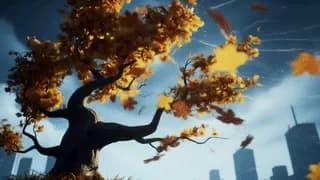
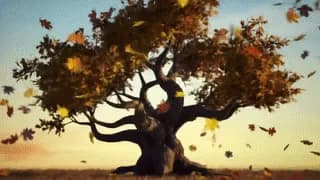
Example. The same prompt with and without a negative prompt:
Create a short stylized animation of a large, solitary oak tree with its leaves whipping in a strong wind. The tree has a slightly exaggerated, whimsical shape with dynamic, flowing branches. Leaves in a range of autumn colors swirl and dance in the wind. The animation has a soft, atmospheric soundtrack and a warm, cozy color palette
urban background, man-made structures, dark, stormy or threatening atmosphere
Where to use this in Solistra
This section is added by Solistra and is not part of Google's guide. The prompt structure from this guide works with other video models too. Try it in Kling 3.0 or Seedance 2.0, and read about the model itself in our guide to Veo 3.1. A glossary of camera moves with examples is in our guide to camera movements, and tips on speech and background noise are in the guide to sound in video.
Sources and licenses
- Video generation prompt guide — the original guide — Google Cloud — CC BY 4.0
- Generating videos with Veo 3.1 in the Gemini API — Google — CC BY 4.0
- Text
- Adapted from «Video generation prompt guide» — Google LLC · CC BY 4.0. An English adaptation by Solistra, written in our own words from the version of the page dated October 28, 2026. It keeps the section order, facts and examples, while the wording and the longer example prompts are rewritten. Omitted are the site navigation, the feedback form, links to other documentation pages and the What's next list. The example videos are not reproduced, and the negative prompt section shows two still frames. Added are an editor's note at the start and a section with links to Solistra guides.
- Images
Frame from the oak tree animation made without a negative prompt — Google LLC · source · CC BY 4.0 — Middle frame of the animation saved as a still WebP image
Frame from the oak tree animation made with a negative prompt and no city background — Google LLC · source · CC BY 4.0 — Middle frame of the animation saved as a still WebP image
Other images — Solistra image
- Checked
- November 12, 2026