For business
AI product photography
Photo Studio in Solistra is product photography without a studio: the model places your product in a scene, on a model or in an interior, and a whole series gets the same light and background. It is made for Wildberries, Ozon, Avito and Yandex Market sellers.
Open Photo Studio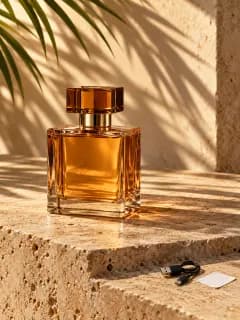
Product photos
Scene from a prompt
Describe the background or pick a ready scene such as travertine, sand, silk, moss, water or chrome.
Product on a model
Upload a photo of a garment and get it worn by a model without a photo shoot.
Consistent series
Apply one photo’s settings to all, and auto processing evens out white balance and exposure.
Light and shadow
Studio lighting, contact or soft shadow and a mirror reflection.
Marketplace sizes
Resize for Wildberries, Ozon, Yandex Market, Avito, stories and VK in one click.
How it works
- 01
Upload a product photo
- 02
Remove the background and pick a scene
- 03
Apply the style to the whole series
- 04
Save or send to product cards
Who it is for
- Clothing and shoe cards
- Cosmetics and fragrance
- Home goods
- Seasonal sale scenes
Frequently asked questions
How do I make AI product photos for Wildberries without hurting my rating?
Keep the real product, its shape, color and logo, and change the scene and background. Wildberries treats unnatural AI photos and distorted characters as card errors.
Can I process my whole catalog at once?
Yes. Series mode applies settings to every photo, and batch processing takes products from a spreadsheet or marketplace export.
Do I need a photographer?
An even phone photo of the product is enough to start. Background, light and scene can be added in Photo Studio.