Contents
MAGI-2 is the new video model from Sand AI, and it is already available in Solistra. In one run it makes a clip from 4 to 30 seconds long in 1080p, with sound and with several shots joined by cuts. You can start from text, from a start frame or from references: photos, video clips and audio recordings. Reach for MAGI-2 when you need a small film made of several shots rather than one continuous take.
The full MAGI-2 is available only through the Sand AI API and its partners, and the developer has not published its weights. In Solistra it works right in the Video section («Видео»), and you do not need a Sand AI account. Below is what we checked in our own runs: how to write a prompt shot by shot, which files to add and what to expect from the model.
What MAGI-2 can do
- A 4 to 30 second clip in 1080p. Duration is set in whole seconds, 5 seconds by default. There is one resolution, 1080p, so there is nothing to choose.
- Sound together with the picture. The model makes the sound for the clip itself. The Sound («Звук») toggle is on by default, and turning it off does not change the cost.
- Several shots in one run. The model understands timestamp markup and places cuts between shots. We got a 20-second clip with five shots.
- Start frame. Sets the beginning of the clip. You can add an end frame if you like, but only together with the start frame.
- References. Up to 10 photos, up to 5 video clips and up to 5 audio recordings. Clips together run up to 30 seconds, and audio recordings together also run up to 30 seconds.
- Aspect ratios. 21:9, 16:9, 4:3, 1:1, 3:4 and 9:16. Auto («Авто») takes the ratio from the start frame, and without a frame you get 16:9.
Which frames and references to add
The form offers two paths, and they do not mix in one run.
- A start frame, plus an end frame if you want one. This is the most reliable way to get the picture you need from the first second. With a start frame, 21:9 is unavailable, and the other ratios work.
- References: photos of characters and objects, clips with motion and audio recordings. Here the model builds the scene itself, and in the prompt you name the role of each file.
The file limits are: photos up to 16 MP, mp4 or mov clips up to 200 MB, mp3 or wav audio up to 15 MB. A long reference clip can be trimmed with the Segment («Отрезок») button right in the form.
How to write a prompt shot by shot
The prompt can be up to 5000 characters. The key MAGI-2 technique is time markup. Start each shot with a time range in square brackets, and write "Hard cut" between shots. The ranges run back to back with no overlaps and add up to the duration you chose.
Three rules worked best for us:
- Name the role of each file. "The ship as in photo 1", "the robot as in photo 2", "the voice as in audio 1". This is how the model knows which file belongs to what.
- Name the main objects again in every shot. In our top-down shot the ship disappeared because the prompt did not mention it, even though it was there in the first two shots.
- Describe what should be in the frame. Film language works better than exclusions: shot type, light, textures, camera movement.
If the clip is a single scene, keep it as one shot. Split into shots only what a real film crew would shoot from different setups.
From our experience
- A clip takes a long time. On average more than 15 minutes, and our runs took from 4 to 35 minutes. This is the working time of the model itself, not of Solistra, and the exact time is not known in advance. Start the clip and get on with other things, the finished file will appear in History («История»).
- Without a start frame the picture more often looks cartoonish. Add at least a start frame, even if you describe everything else in text.
- Exclusions in the prompt do not help. Instead of "not a cartoon, no CGI, not toy-like", write "a still from a feature film, an overcast redwood forest, wet dirty metal, handheld camera".
Example prompts
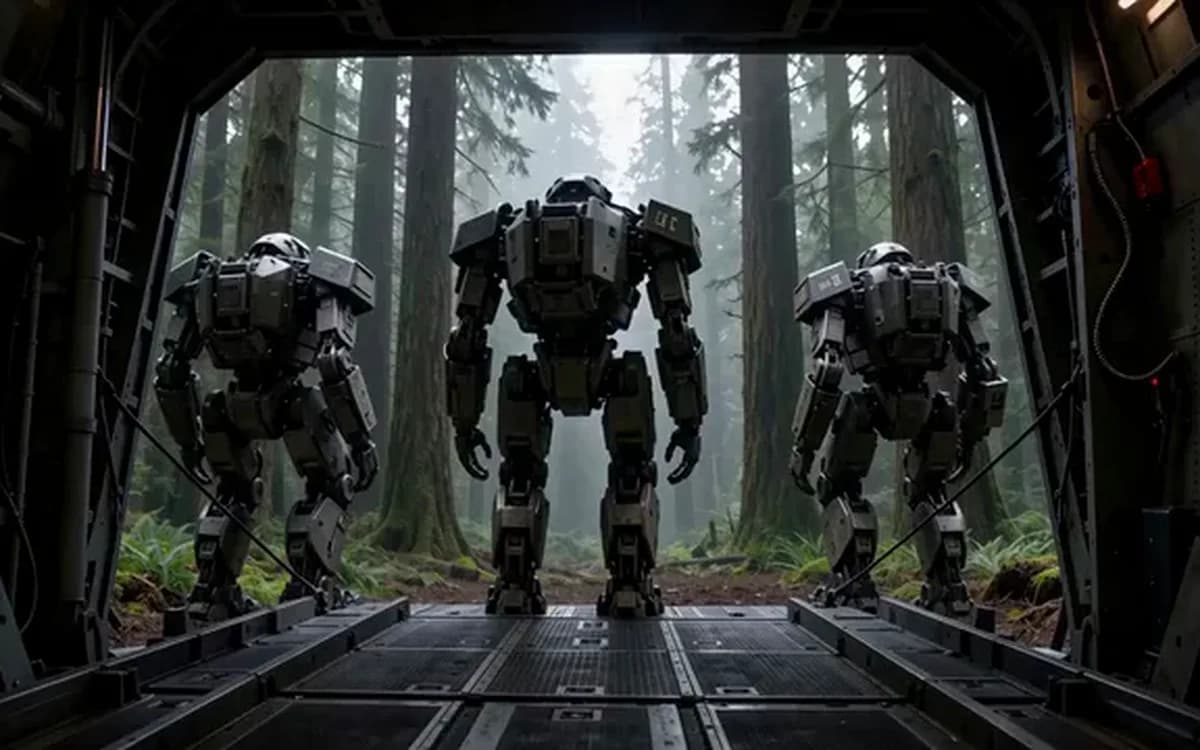
The first example is the one behind the clip on the model's cover. The others follow the same rules.
[0–4 s] Shot 1: a still from a feature film, an overcast redwood forest, a cargo ship as in photo 1 stands on the moss, the ramp lowers, handheld camera. [4–8 s] Hard cut. Shot 2: three robots as in photo 2, wet dirty metal, walk down the ramp out of the ship, the camera low to the ground. [8–12 s] Hard cut. Shot 3: top-down view, the ship and the robots among the redwoods, fog between the trunks
Photo 1 is the ship and photo 2 is the robot, both in References («Референсы»). The ship is named in the third shot too, otherwise it may disappear.
A still from a feature film. The young woman from the start frame stands at the window of an old apartment, rain running down the glass. She slowly turns to the camera and smiles. The handheld camera moves in slightly, warm light from a desk lamp, soft shadows. Sound: rain on the glass, the quiet ticking of a clock
[0–5 s] Shot 1: a still from a feature film, an early morning fish market, a vendor in a rubber apron spreads ice on the counter, breath steaming in the cold, handheld camera. [5–10 s] Hard cut. Shot 2: close-up of the vendor's hands placing a silver fish on the ice, drops of water glinting in cold light. Sound: the hum of the market, crunching ice
[0–6 s] Shot 1: a man as in photo 1 sits at a desk in a small recording studio and speaks into a microphone, the voice as in audio 1. A still from a documentary, medium shot. [6–12 s] Hard cut. Shot 2: close-up of his hands on the mixing desk, a melody as in audio 2 plays in the background. Warm tube-amp light
A still from a feature film, an overcast redwood forest, the wet dirty metal of an old all-terrain truck, clay on the wheels, handheld camera, diffused light through the fog
Common mistakes
- Running without a start frame when you need realism. Without a frame the model more often drifts into a cartoonish look. Even one frame helps a lot.
- A list of exclusions. The model does not follow "not a cartoon, not CGI, no plastic". Describe what the picture should look like.
- An object named only in the first shot. The model may lose it in the next shot. Name the main characters and objects in every shot.
- A shot that is too short. The model may compress a short shot. If a shot matters, give it more time.
- Overlapping ranges. "[0–6 s]" and "[5–10 s]" break the markup. Ranges run strictly back to back.
- Frames and references together. The model does not accept them, and the form will not let you mix them. Pick one path.
- Expecting a finished clip in a minute. MAGI-2 takes a long time, and we have seen runs of half an hour. Do not restart the task early, just wait for the result.
There can be logical jumps between shots: a character may end up somewhere other than you expected. A short note on where everyone stands at the start of each shot helps.
How to try it in Solistra
Open MAGI-2 in the Video section, add a start frame or references, mark up the prompt shot by shot and choose the duration and aspect ratio. The cost shows on the run button before you start. A short overview of the model and its neighbors is on the MAGI-2 page.
If time ranges still feel unfamiliar, see our guide on shot length and action phases. How to keep one character across all shots is covered in the guide on character consistency and reference roles. To compare with another model for long stories, read our guide to Seedance 2.5, and large scenes with complex camera work are covered in the guide to Kling 4.0.
Frequently asked questions
Where can I try MAGI-2 online?
MAGI-2 is already in the Video section of Solistra. You do not need a Sand AI account, and the prompt can be in English even though the interface is in Russian.
How long does a MAGI-2 generation take?
On average more than 15 minutes, and our runs took from 4 to 35 minutes. This is the time of the model itself, and the exact time is not known in advance.
Can I make a 30-second clip?
Yes, the duration can be set from 4 to 30 seconds. For a long clip, split the prompt into several shots with timestamps.
Can I add a start frame and references together?
No. Use either a start frame, optionally with an end frame, or references: photos, clips and audio.
Why did my clip come out cartoonish?
Most often this happens without a start frame or when the prompt is made of exclusions. Add a start frame and describe a realistic picture in film language.
Try it in Solistra
MAGI-2
Video
Similar models
Sources and licenses
- MAGI-2, the model announcement — Sand AI
- Sand AI API documentation, creating a generation — Sand AI
- MAGI-2 Reference-to-Video, route parameters — WaveSpeed
- Text
- Solistra text. Our own wording and prompt examples, quotes under 15 words
- Images
Other images — Solistra image
- Checked
- November 26, 2026