Photo effect
Knitted World
a cozy scene knit from wool yarn
Knitted World («Вязаный мир») turns a snapshot into a cozy scene made of wool. The person and everything around them look hand-knit on needles, and the loops and knit pattern are easy to make out without zooming in.
Try this effect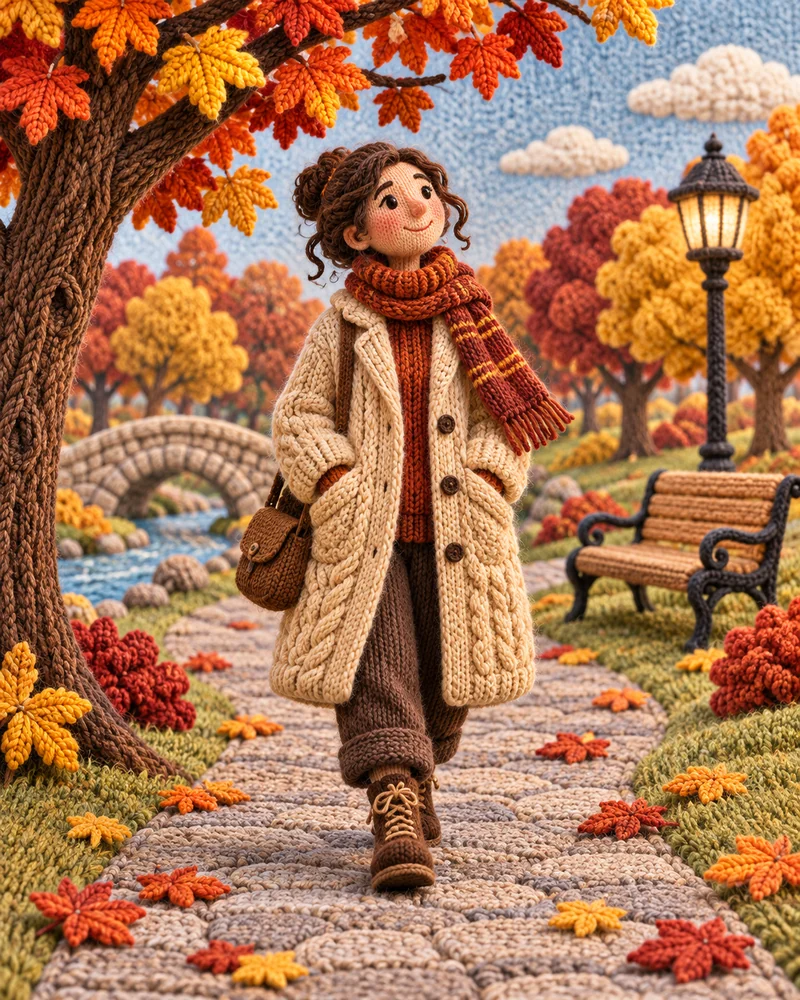
What the effect does
Unlike embroidery or felt, here it is not just the portrait that turns knitted but the whole world around the person. The effect puts the wool texture front and center: you see rows of loops, the softness of the yarn and the warm feel of a winter sweater. The scene is built from scratch, so the surroundings and clothes in the image will differ from the original photo.
There is nothing to describe in words, since the prompt and model are already chosen. All that is left is to pick a format: 4:5, 1:1 or 16:9. The button shows the credit price before you run it. The result is saved to your Library («Библиотека»), where you can download or refine it. If a generation fails because of a technical error, your credits are returned.
Which photo works best
The hint by the photo field sums it up: the whole face is visible and the light is even. A head-and-shoulders or waist-up portrait taken in daylight without flash works well. Heavily retouched shots with smoothed skin are better swapped for ordinary ones. You can upload a photo or pick one from your Library.
How to get the best result
- 01
Soft light without harsh shadows helps the facial features come through clearly in the wool texture
- 02
A vertical 4:5 works well for a holiday card, a horizontal 16:9 for a community page header
- 03
Take off sunglasses and remove app face masks so the whole face reads clearly
- 04
To see a different take on the knitted scene, run the effect again with the same photo
Frequently asked questions
How is Knitted World different from the embroidery effect?
The embroidery effect («Вышивка») makes a portrait out of threads stitched on linen. Knitted World builds a whole wool scene around the person, where the loops and the knit pattern take center stage.
Will the knitted effect work for a family card?
The effect needs a subject with a clearly visible face, so a portrait of one person works most reliably. For a shared card, you can make several images separately.
Can I edit the knitted image after it is generated?
Yes. The finished result is saved in your Library, where you can open it in the Image section and refine it with your own prompt, for example to change the yarn color or the background.